🇬🇧 This article is in English. Eine deutsche Fassung gibt es als separaten Beitrag.
Let me be honest right from the start: FreeIPA is the biggest thing I have taken on so far. BunkerWeb was a reverse proxy, code-server an (admittedly stubborn) Node.js project. FreeIPA, on the other hand, isn’t a single program but a whole stack: a directory server, a Kerberos KDC, its own certificate authority and a web interface, all of which have to work together. On Linux that’s a well-oiled machine. On FreeBSD it simply didn’t exist.
I’ve been at it in the evenings for months. The server installation now runs to completion, a FreeBSD client can enroll into the domain, and the box even survives a reboot. That’s exactly why I’m writing this: I now need people to test the whole thing on their systems. But let’s take it in order.
1. Why FreeIPA on FreeBSD?
The question that basically starts everything for me was the same as with BunkerWeb: what do I reach for on FreeBSD when I need central identities? A single place where users, groups, hosts, password policies and certificates come together, the thing Active Directory does in the Windows world.
The honest answer: not much. You can cobble something together yourself from OpenLDAP, a Kerberos KDC and a handful of scripts, but that’s manual, error-prone, and nobody maintains it except you. FreeIPA is exactly that combination, only properly integrated: web UI, CLI, clean delegation, and a certificate authority that issues and renews host and service certificates automatically. On Linux FreeIPA has been the answer for years. I wanted it on FreeBSD too.
2. What actually had to be ported
FreeIPA is one product on the outside and half a dozen projects on the inside. For freeipa-server to build and run at all, there’s a whole substructure hanging off it that I had to bring to FreeBSD piece by piece:
| Component | Role |
|---|---|
| 389 Directory Server | The LDAP directory, the heart where everything lives |
| MIT Kerberos (KDC) | Authentication, tickets, single sign-on |
| Dogtag PKI | The certificate authority (CA), Java/Tomcat, a monster of its own |
| Apache + mod_wsgi | Web UI and API, the framework runs in Python |
| SSSD, slapi-nis, oddjob … | Client-side resolution, schema compatibility, helper services |
The core of all of it is one question that runs through the entire port: Kerberos. FreeBSD ships its own Kerberos in the base system; the ports tree has MIT Kerberos (security/krb5). FreeIPA expects one Kerberos throughout, the one from ports. The moment the base Kerberos sneaks in somewhere, the stack blows up in your face. That was the common thread behind most of the hard bugs.
3. The nights you don’t see on the box
A port is, in the end, a pkg install. What you don’t see are the evenings before it. Three stories, standing in for many:
The directory server that simply crashes on a GSSAPI bind. The installer ran almost to the end and then ns-slapd fell over with signal 6, reproducibly and without an error message. The trail led to the SASL GSSAPI plugin, which was linked against the base Kerberos while the rest of the process used the ports Kerberos. Two Kerberos libraries in one process, and the kernel turns that into an abort(). The fix: security/cyrus-sasl2-gssapi has to be built with the GSSAPI_MIT option. Sounds like a checkbox, but it was days of elimination.
The JSON response that arrived truncated at 64 KB. The very last step of the installation fetches the LDAP schema over HTTP, and the response came in cut off, always somewhere around 64 kilobytes. I cornered it with a tiny, isolated mod_wsgi test program until the culprit was clear: FreeIPA sets a socket timeout to INT_MAX to effectively disable timeouts. On FreeBSD that value, multiplied by 1000, overflows in a 32-bit context and becomes a tiny or negative timeout. The daemon gave up after the first buffer. A single numeric value, half an evening of detective work.
The server that shut itself down after every reboot. My favourite. Freshly installed, everything ran. After a reboot the directory server came up and cleanly shut itself back down about twenty seconds later. No crash, no error in the log, nothing. Only at boot, never on a manual start. Over roughly fourteen reboots I traced every signal to the process with dtrace, until there it was: FreeBSD’s rc system cleans up the process group at the end of a boot subshell and sends it a SIGHUP. The 389 Directory Server treats SIGHUP as „please shut down“. The fix is a single line in the rc script: the service is now started via daemon(8) in its own session, out of reach of the boot-time SIGHUP. But it takes a lot of evenings before you know that’s what it is.
I’m not telling you this to complain, but because exactly these little things are the difference between „runs on Linux“ and „runs on FreeBSD“. And because they show why I need testers now: some of these effects only surface under very specific conditions.
4. Where I stand today
The state, plainly: on FreeBSD 15.1, ipa-server-install runs to completion. Afterwards all the services are up, that is the directory server, KDC, kadmin, the Dogtag CA, httpd, the KDC proxy and the OTP daemon:
Directory Service: RUNNING
krb5kdc Service:    RUNNING
kadmin Service:     RUNNING
httpd Service:      RUNNING
ipa-custodia:       RUNNING
pki-tomcatd:        RUNNING   (the CA)
ipa-otpd:           RUNNING
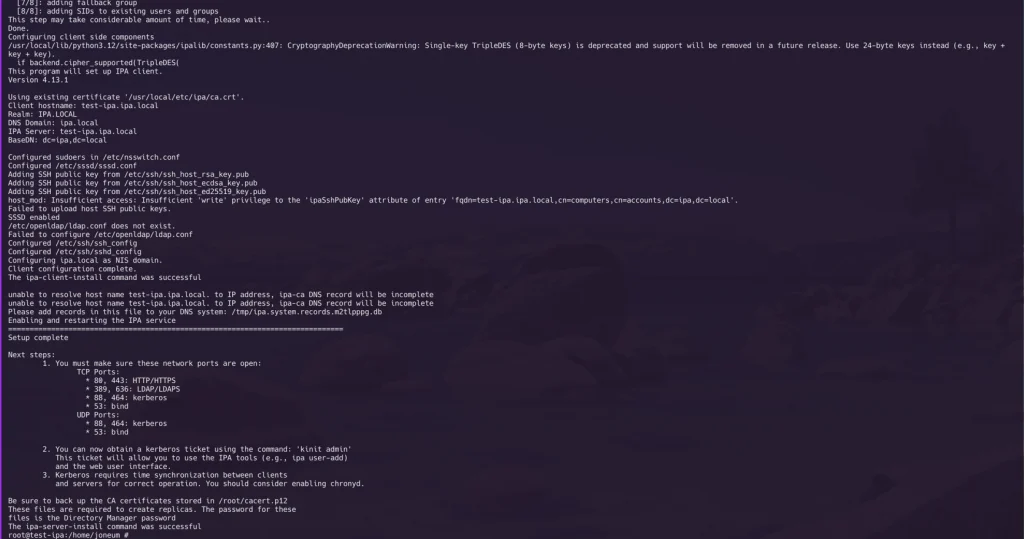
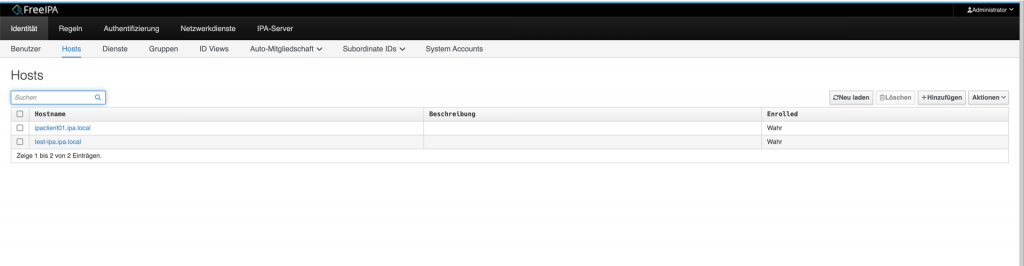
ipa ping answers with „IPA server version 4.13.1“, the web interface comes up cleanly, and a FreeBSD client can enroll with ipa-client-install and then resolve IPA users through SSSD: id admin and getent passwd admin return what they should. And, most important after the reboot odyssey: the machine comes back up fully on its own after a restart.
The rough layout looks like this:
        Browser / ipa CLI / client
                   │  HTTPS (Kerberos/SPNEGO)
                   ▼
        Apache + mod_wsgi  ───►  Dogtag PKI (CA, Java/Tomcat)
                   │
                   ▼
        389 Directory Server (LDAP)  ◄──►  MIT Kerberos KDC
5. The actual reason for this article: please test with me
I’m hereby officially issuing a Call For Testing. The port is not yet in the official FreeBSD ports tree. It’s meant to get there, but first I want as many eyes and as many different setups as possible looking at it.
I’ve put both ports (server and client) together with documentation on GitHub:
👉 github.com/joneum/FreeBSD-freeipa-server
What I’m asking for: build it, install it, set up a server, enroll a client, reboot the box, turn every screw you can find, and tell me what works and what doesn’t. The uncomfortable paths are the interesting ones: external CA, custom realm/domain combinations, the full ipa command surface, replicas, uninstalling. Please file bug reports as GitHub issues.
A few honest words up front, so nobody walks into a trap:
- Not for production. This is explicitly work-in-progress for testing. Use a throwaway VM, not your company login server.
- One stumbling block first:
security/cyrus-sasl2-gssapimust be built withGSSAPI_MIT(see above), otherwise the installation fails right at the very end. It’s all in the README. - The substructure is already in the tree. All the dependencies (389-ds-base with my changes, Dogtag, slapi-nis and the others) are committed by now. From this repo you only need the two FreeIPA ports themselves.
- The client (
net/freeipa-client) needs fixes that are still open as a pull request (PR 297487). The patched version is included in the same repo.
6. How to get in
Because the repo mirrors the ports-tree layout, getting started is short:
git clone https://github.com/joneum/FreeBSD-freeipa-server.git /tmp/ipa-cft
cp -R /tmp/ipa-cft/net/freeipa-server \
      /tmp/ipa-cft/net/freeipa-client /usr/ports/net/
Then add the two things that live outside the port directories: the SUBDIR entry in net/Makefile and the service users in the tree-wide UIDs/GIDs files (the matching lines are in the repo under tree-integration/). Then build, preferably with poudriere and the Kerberos option mentioned above:
# in the build jail's make.conf:
security_cyrus-sasl2-gssapi_SET=GSSAPI_MIT
security_cyrus-sasl2-gssapi_UNSET=GSSAPI_BASE

poudriere testport -j <jail> -p <tree> net/freeipa-server
The rest (ipa-server-install, the required rc.conf lines freeipa_server_enable, dbus_enable, gssproxy_enable, and the way into the web interface) is documented in the detailed README inside the port. That documentation, by the way, also welcomes corrections.
Conclusion
FreeIPA on FreeBSD isn’t at the finish line yet, but it’s remarkably far: the server stands, the client enrolls, the reboot holds. What matters now is real-world use on other people’s systems, and that is exactly what a Call For Testing is for. If you run FreeBSD and have always missed a real identity-management solution on it: now is the moment to join in.
In a follow-up article I’ll take one of these hard bugs apart in detail, probably the reboot story, that one’s worth it.
And on a personal note to close: I do all of this unpaid, alongside a regular job and a family. I also pay for the hardware I test on in VMs entirely myself, at Hetzner. If you find my work useful, I’d be glad about a donation. I’d be especially glad if companies chip in that run FreeBSD and get real value from ports like this, because they save real money with it. The links to PayPal, Patreon and GitHub Sponsors are in the sidebar. Every contribution helps.
Very impressive! I’ve made multiple attempts at using krb5 for my inter-server comms, but never arrived at something I truly like.
I’ll spin this up in the next day or so for a test!
N.