nginx compresses with gzip, and gzip is from 1992. It is understood everywhere and it costs almost nothing, which is why it is still the default answer. The usual step up is brotli, which packs text noticeably tighter but wants a lot more CPU for it, so people set it to a low level and get most of the cost without most of the benefit.
Zstandard sits in between and is the reason this module exists. It reaches roughly what brotli reaches at comparable settings, at a fraction of the processor time, and every current browser announces zstd in Accept-Encoding.
There are two modules in the package, and picking the right one is the first decision:
ngx_http_zstd_filter_modulecompresses a response while it is being sent.ngx_http_zstd_static_modulecompresses nothing at all. It looks for a.zstfile next to the one that was requested and sends that.
If your assets are built by a pipeline, the second one is almost always the better answer: the work happens once at deploy time instead of on every request.
The smallest configuration that works
server {
    location / {
        zstd            on;
        zstd_types      text/css application/javascript application/json;
        zstd_comp_level 6;
        zstd_min_length 256;

        proxy_pass http://backend;
    }
}
Four directives, and three of them are there because the defaults are not what you want. More on that in a moment.
For the static side, nothing but the switch:
server {
    location / {
        zstd_static on;
        root        /usr/local/www/site;
    }
}
A request for /app.js is then answered with /app.js.zst if that file exists, with Content-Encoding: zstd. Produce them at deploy time and keep the originals, because clients that do not speak zstd still need them:
$ find /usr/local/www/site -regex '.*\.\(css\|js\|svg\|json\)$' \
    -exec zstd -19 -q --keep {} \;
Level 19 is reasonable here. The file is compressed once and served thousands of times, so the processor time does not matter.
The defaults that will surprise you
zstd_comp_level is 1. That is the fastest level Zstandard has and it leaves a good deal of ratio on the table. The default is low for the same reason nginx ships gzip_comp_level 1, namely to not surprise anybody with CPU load, but for text served from a proxy, 3 to 6 is the range worth testing. The measurement further down shows why, and where it stops paying off.
zstd_types is text/html only. Exactly like gzip_types. HTML is always included and cannot be removed, everything else has to be named. The types that actually matter on a modern site are CSS, JavaScript, JSON and SVG:
    zstd_types text/css text/plain application/javascript application/json
               application/xml image/svg+xml;
* matches everything, which is tempting and wrong: JPEG, PNG, WebP, MP4 and anything else already compressed gets bigger, not smaller, and you burn processor time to achieve it.
zstd_min_length is 20 bytes. Twenty. Compressing a response that small costs more in header bytes than it saves. 256 is a sane floor, 1024 is defensible.
The length comes from Content-Length, so a response that does not carry one, every chunked response from a proxy for instance, is always compressed no matter how short it turns out to be.
What happens when gzip is also on
Both filters sit in the same chain. The one that runs first compresses, and the second one then finds a response that already carries a Content-Encoding and leaves it alone. There is no double compression and no negotiation between the two: whichever filter nginx calls first wins, and that order follows the order the modules were added at build time.
In practice this is less dramatic than it sounds, because a client that announces zstd almost always announces gzip as well, and you care which one it gets. If you want zstd to take precedence, either build it ahead of the gzip filter, or simply leave gzip off in the locations where you turn zstd on.
The filter sets Vary: Accept-Encoding before it checks whether the client can take zstd at all. That is deliberate and it is what you want in front of a cache: the response varies by that header even when this particular request got no compression.
One more condition worth knowing: only responses with status 200, 403 and 404 are compressed. An error page from your backend that comes back as 500 goes out uncompressed.
What it costs, measured
Talking about levels in the abstract is useless, so here is the measurement that matters for a web server: how much processor time the worker spends to reach a given ratio. Both filters in the same nginx, the same 614 KB of real assets from this blog, one worker, 300 requests per point.
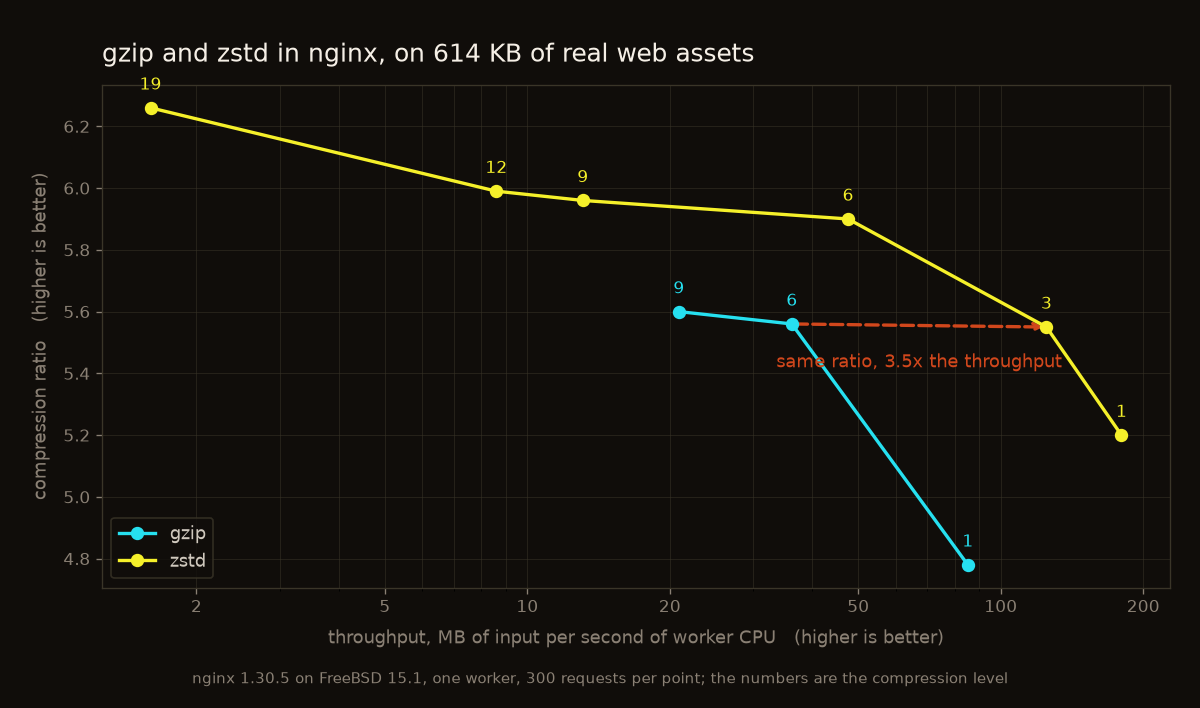
The zstd curve lies above and to the right of the gzip curve over its whole useful range, which means there is no level of gzip that is better in both respects than some level of zstd. Two points are worth naming:
| ratio | MB of input per second of worker CPU | |
|---|---|---|
| gzip 1 | 4.78 | 85 |
| zstd 1 | 5.20 | 180 |
| gzip 6 | 5.56 | 36 |
| zstd 3 | 5.55 | 125 |
zstd 3 delivers what gzip 6 delivers and costs a third of the processor time doing it. At level 1 against level 1, zstd is both smaller and faster.
What the graph also shows is where to stop. Above level 6 the ratio barely moves while the cost keeps climbing: level 9 buys one percent over level 6 and costs three and a half times as much. Level 19 is off the useful scale entirely for on the fly compression, at 1.6 MB per processor second, and it is exactly the right level for files you compress once at deploy time.
Measuring it on your own content
The module exports one variable, and it belongs in your log format while you are tuning:
log_format zstd '$request $status $body_bytes_sent ratio=$zstd_ratio';$zstd_ratio is the size that went in divided by the size that came out, so 3.40 means the response left at a bit under a third of its original size. It is empty where nothing was compressed, which makes it equally useful for finding out what your zstd_types list is missing.
Set the level, reload, look at the ratios and at your processor load, and decide. That is a better method than arguing about levels in the abstract, because the answer depends entirely on what you serve.
The dictionary, and why to leave it alone
Zstandard supports training a dictionary on a corpus and compressing against it, which helps a great deal with many small similar payloads. The module can load one:
zstd_dict_file /usr/local/etc/nginx/api.dict;Be careful with it. The zstd content coding says how to signal that Zstandard is in use and nothing at all about agreeing on a dictionary. There is no mechanism for a client to discover which one you loaded, and a client that decompresses without it gets garbage.
So this is for the case where both ends are yours, an internal API with your own client, and where you can agree out of band, through a header of your own for example. For anything a browser will fetch, leave it unset.
When it does not work
The usual complaint is that nothing is compressed. Work through it in this order, because the module is silent about all of these:
Did the client ask? Nothing happens without zstd in Accept-Encoding:
$ curl -s -H 'Accept-Encoding: zstd' -D - -o /dev/null https://example.com/app.js
HTTP/2 200
content-encoding: zstd
vary: Accept-Encoding
No content-encoding in the answer means the module decided against it.
Is the type in the list? This catches most cases. application/json and image/svg+xml are not in the default, and neither is application/javascript.
Is the response long enough, and does it have a Content-Length?
Is something else compressing first? If the answer says content-encoding: gzip, the gzip filter got there first.
For the static module the question is different: it needs the .zst file to be there, next to the original, readable by the worker. There is no fallback to compressing on the fly, the two modules know nothing about each other. A missing .zst file simply means the plain file is sent.
If the build itself fails to find Zstandard, the library is looked for in $ZSTD_INC and $ZSTD_LIB first, then on the compiler’s own search path, then under /usr/local, which is where FreeBSD puts it. The static archive is preferred over the shared library, because the filter uses functions that Zstandard only declares for static linking.
On FreeBSD
Both modules come from the nginx ports, with the sources in their own port:
# make -C /usr/ports/www/nginx config     # tick ZSTD
# make -C /usr/ports/www/nginx install clean
Available on www/nginx, www/nginx-devel and www/freenginx. Built as loadable objects by default, and since this is a package of two modules, both lines are needed before their directives can be used:
load_module modules/ngx_http_zstd_filter_module.so;
load_module modules/ngx_http_zstd_static_module.so;
Only the filter is linked against the Zstandard library. The static module calls into no library at all, which is worth knowing if you are assembling a minimal build.
What it does not do
It compresses responses. It does not decompress requests, so a client that sends a zstd encoded body is not something nginx will unpack for your backend.
The static module does not create anything. If there is no .zst file, the plain one is sent, and nothing tells you about it beyond the absent Content-Encoding.
And neither module touches the negotiation between encodings. nginx has no notion of preferring zstd over gzip by quality value; the order of the filters decides, and that is set when the binary is built.
Where it is
The sources, the full directive reference and the test suite: github.com/sysadmin-labs/nginx-zstd-module
The FreeBSD port, with its package state, its CVE status and the branches it is in: www/nginx-module-zstd on portstatus
BSD 2-Clause.